Seq2Seq from Scratch: Building an English-to-French Translator with LSTMs
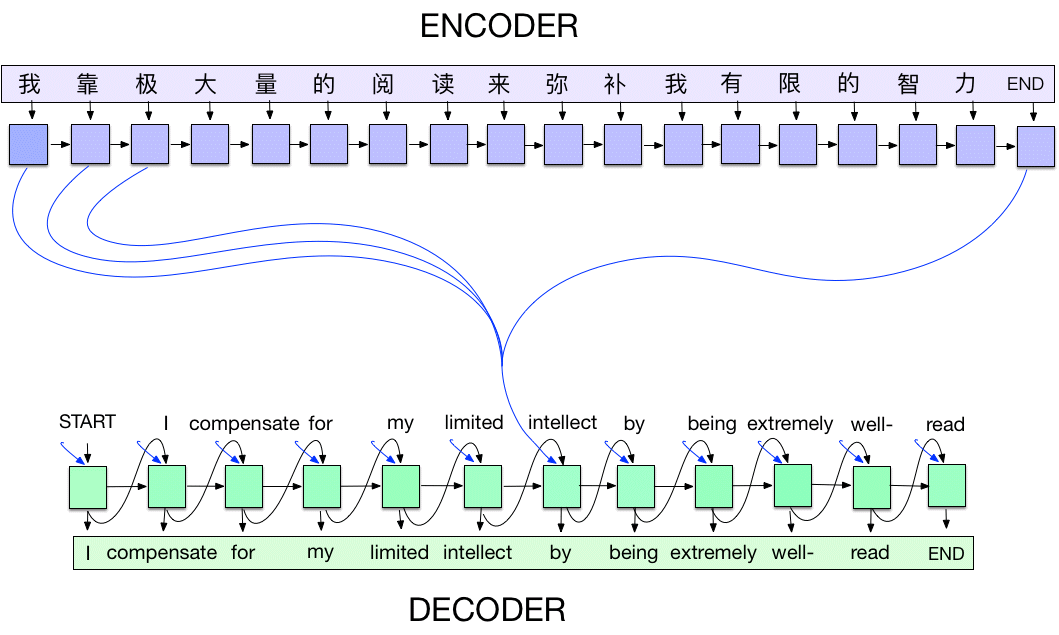
A complete guide to understanding and implementing Sequence-to-Sequence models.
Table of Contents
- What is Seq2Seq?
- The Architecture
- Vocabulary: Converting Words to Numbers
- The Encoder
- The Decoder
- Hidden State & Cell State Explained
- Training: Teacher Forcing
- Inference: Greedy Decoding & Beam Search
- The Bottleneck Problem
- How to Actually Remember This
What is Seq2Seq?
Seq2Seq (Sequence-to-Sequence) is an architecture designed for tasks where both input and output are sequences of variable length. Perfect for:
- Machine Translation (English → French)
- Text Summarization (long article → short summary)
- Chatbots (question → answer)
The key challenge: input and output can have different lengths.
Input:  "how are you"     (3 words)
Output: "comment allez vous" (3 words) ✓ same length

Input:  "hello"           (1 word)
Output: "bonjour"         (1 word) ✓ same length

Input:  "thank you"       (2 words)
Output: "merci"           (1 word) ✗ different length!
Traditional neural networks need fixed input/output sizes. Seq2Seq solves this elegantly.
The Architecture
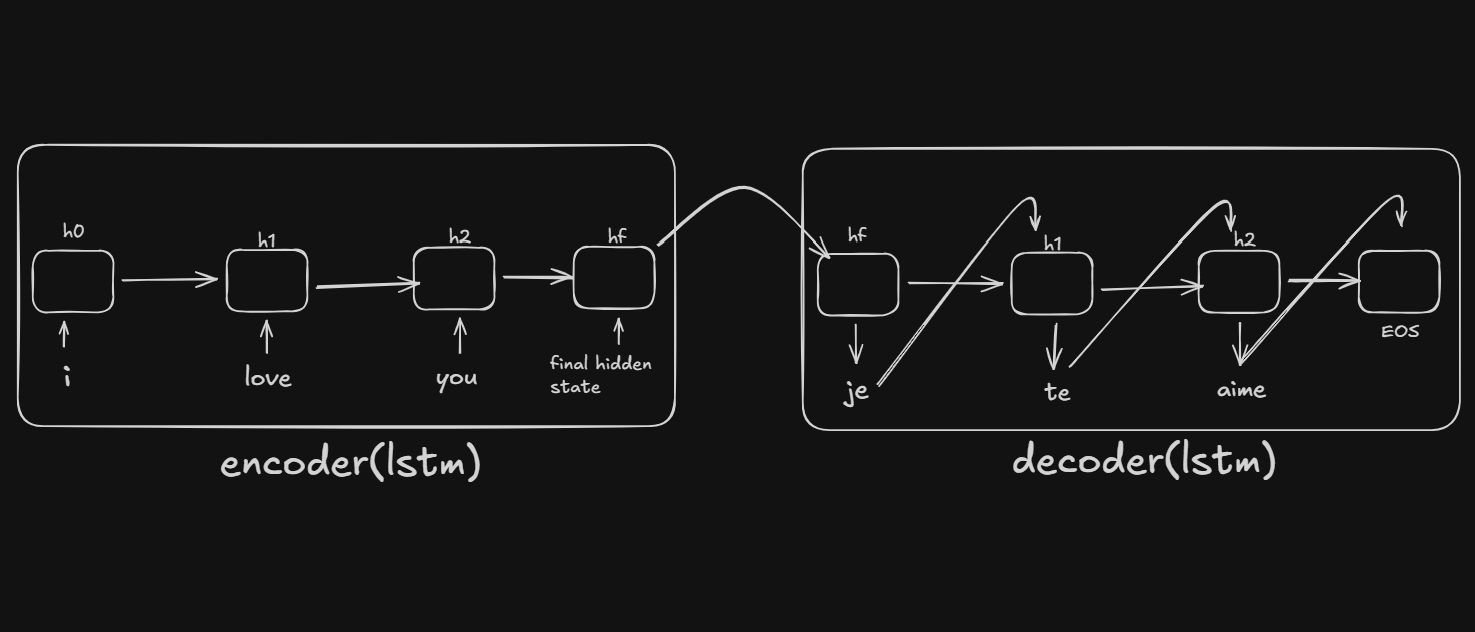
Seq2Seq has two main components:
English: "i love you" → [ENCODER] → Context Vector → [DECODER] → "je t aime"
Encoder
- Reads the input sentence word by word
- Compresses the entire sentence into a fixed-size context vector (the final hidden state)
- This vector captures the "meaning" of the input sentence
Decoder
- Takes the context vector as its initial state
- Generates the output sentence word by word
- At each step, predicts the next word based on previous words + context
Why LSTM?
- LSTMs can remember long-range dependencies (e.g., subject-verb agreement across many words)
- They solve the "vanishing gradient" problem of vanilla RNNs
- They have a "cell state" that acts as a highway for information
Vocabulary: Converting Words to Numbers
Neural networks only understand numbers, not text. We need to:
- Collect all unique words
- Assign each word a unique number (index)
- Be able to convert back and forth
The Vocabulary Class
class Vocabulary:
    def __init__(self, name):
        self.name = name
        self.word2idx = {'<PAD>': 0, '<SOS>': 1, '<EOS>': 2}
        self.idx2word = {0: '<PAD>', 1: '<SOS>', 2: '<EOS>'}
        self.n_words = 3  # Start after special tokens
Two dictionaries:
word2idx: word → number (e.g.,"hello"→5)idx2word: number → word (e.g.,5→"hello")
Three special tokens:
| Token | Index | Purpose |
|---|---|---|
<PAD> | 0 | Padding - fills empty spots when batching different-length sentences |
<SOS> | 1 | Start of Sequence - tells decoder "start generating now" |
<EOS> | 2 | End of Sequence - tells decoder "stop generating" |
Building the Vocabulary
def add_word(self, word):
    if word not in self.word2idx:
        self.word2idx[word] = self.n_words
        self.idx2word[self.n_words] = word
        self.n_words += 1
Each new word gets the next available index:
Processing: "i am cold", "i love you"

Start:     {<PAD>: 0, <SOS>: 1, <EOS>: 2}
Add "i":   {<PAD>: 0, <SOS>: 1, <EOS>: 2, i: 3}
Add "am":  {<PAD>: 0, <SOS>: 1, <EOS>: 2, i: 3, am: 4}
Add "cold":{<PAD>: 0, <SOS>: 1, <EOS>: 2, i: 3, am: 4, cold: 5}
Add "love":{<PAD>: 0, <SOS>: 1, <EOS>: 2, i: 3, am: 4, cold: 5, love: 6}
Add "you": {<PAD>: 0, <SOS>: 1, <EOS>: 2, i: 3, am: 4, cold: 5, love: 6, you: 7}

Note: "i" already exists when processing second sentence, so it's skipped.
Converting Sentences
def sentence_to_indices(self, sentence):
    return [self.word2idx[word] for word in sentence.split()]

# Example:
"i love you" → [3, 6, 7]
Why Separate Vocabularies?
We create separate vocabularies for English and French because:
- Different languages have different words
- Same index can mean different things in each language
- Vocabulary sizes differ
The Encoder
The encoder reads the input and produces a context vector.
Architecture
Input: "i love you"
         ↓
   [3, 6, 7]  (word indices)
         ↓
   Embedding Layer  (index → 256-dim vector)
         ↓
   [emb_i, emb_love, emb_you]  (three 256-dim vectors)
         ↓
   LSTM (processes sequentially)
         ↓
   hidden state [512 values]  ← This is the context vector!
The Code
class Encoder(nn.Module):
    def __init__(self, input_size, embedding_dim, hidden_dim):
        super().__init__()
        self.embedding = nn.Embedding(input_size, embedding_dim)
        self.lstm = nn.LSTM(embedding_dim, hidden_dim)

    def forward(self, src):
        embedded = self.embedding(src)    # [seq_len, batch, embed_dim]
        outputs, (hidden, cell) = self.lstm(embedded)
        return hidden, cell               # Context vector!
What is the Embedding Layer?
nn.Embedding is a lookup table that converts word indices to dense vectors:
Word index 5 → Look up row 5 → Get 256-dimensional vector

Conceptually:
┌─────────────────────────────┐
│  Index 0 (PAD): [0.0, 0.0, ...]  │  ← always zeros
│  Index 1 (SOS): [0.2, -0.1, ...] │
│  Index 2 (EOS): [0.5, 0.3, ...]  │
│  Index 3 ("i"): [0.1, 0.4, ...]  │
│  ...                             │
└─────────────────────────────┘
Why embeddings instead of one-hot encoding?
- One-hot is sparse and huge: [0,0,0,1,0,0,0,...] (vocab_size dimensions)
- Embeddings are dense and learned
- Similar words get similar vectors ("king" and "queen" end up close)
What Does 512 Dimensions Mean?
The hidden state is a vector with 512 numbers:
hidden state = [0.23, -0.87, 0.45, 0.12, ..., -0.34, 0.56]
                 ↑                                      ↑
               value 1                              value 512

Shape: [1, 1, 512] = [num_layers, batch, hidden_dim]
These 512 numbers are the "compressed meaning" of the entire input sentence. The LSTM learned what information to store in each position during training.
The Decoder
The decoder generates output words one at a time. Think of it as autocomplete on your phone - given what came before, predict the next word.
The Decoder's Job
Input:  Context vector (from encoder) + previous word
Output: Next word
Architecture
Previous word ("je")
        ↓
   Embedding (index → 256-dim)
        ↓
   LSTM (with hidden state from previous step)
        ↓
   Linear layer (512 → vocab_size)
        ↓
   Logits for every word in vocabulary
        ↓
   argmax → predicted word ("t")
The Code
class Decoder(nn.Module):
    def __init__(self, output_size, embedding_dim, hidden_dim):
        super().__init__()
        self.embedding = nn.Embedding(output_size, embedding_dim)
        self.lstm = nn.LSTM(embedding_dim, hidden_dim)
        self.fc = nn.Linear(hidden_dim, output_size)  # New! Maps to vocabulary

    def forward(self, input, hidden, cell):
        embedded = self.embedding(input.unsqueeze(0))  # Add seq dimension
        output, (hidden, cell) = self.lstm(embedded, (hidden, cell))
        prediction = self.fc(output.squeeze(0))        # Vocab scores
        return prediction, hidden, cell
Key Difference from Encoder
The decoder has a Linear layer (fc) that maps the hidden state to vocabulary probabilities:
hidden state [512 values]
        │
        ▼ Linear layer (matrix multiplication)
        │
logits [vocab_size values] = score for each word
        │
        ▼ argmax (pick highest)
        │
predicted word index
Step-by-Step Example: "i love you" → "je t aime"
Setup: Encoder has processed "i love you" and produced:
hidden₀: [512 values] - the context vectorcell₀: [512 values] - LSTM memory
STEP 1: Generate first French word
Input to decoder:
  - previous word = <SOS> (start token)
  - hidden = hidden₀ (from encoder)
  - cell = cell₀ (from encoder)

Inside decoder:
  1. Embed <SOS>: index 1 → [256 values]

  2. LSTM processes it:
     LSTM(embedding, hidden₀, cell₀) → hidden₁, cell₁

  3. Linear layer predicts:
     hidden₁ [512] → Linear → logits [vocab_size]

     logits = [-2.1, -5.0, -4.2, 0.3, 8.5, -1.2, ...]
               <PAD> <SOS> <EOS>  j    je   tu
                                       ↑
                                 highest = "je"

Output: "je", hidden₁, cell₁
STEP 2: Generate second French word
Input to decoder:
  - previous word = "je" (what we just predicted)
  - hidden = hidden₁ (updated from step 1)
  - cell = cell₁

Inside decoder:
  1. Embed "je": index → [256 values]
  2. LSTM: (embedding, hidden₁, cell₁) → hidden₂, cell₂
  3. Linear: hidden₂ → logits → argmax → "t"

Output: "t", hidden₂, cell₂
STEP 3: Input "t" → Predict "aime"
STEP 4: Input "aime" → Predict <EOS> → STOP!
Visual Summary
Encoder output: hidden₀ (contains meaning of "i love you")
                   │
                   ▼
Step 1:  <SOS> + hidden₀ ──DECODER──► "je"  + hidden₁
                                         │
                                         ▼
Step 2:  "je" + hidden₁ ──DECODER──► "t"   + hidden₂
                                         │
                                         ▼
Step 3:  "t"  + hidden₂ ──DECODER──► "aime" + hidden₃
                                         │
                                         ▼
Step 4:  "aime" + hidden₃ ──DECODER──► <EOS>  ← STOP!

Final output: "je t aime"
Why One Word at a Time?
The decoder is autoregressive - each prediction depends on previous predictions:
Can't predict word 3 without knowing word 2
Can't predict word 2 without knowing word 1
Must go step by step!
This is why the decoder processes ONE word at a time, unlike the encoder which can process all words at once.
Hidden State & Cell State Explained
Does the Decoder Have Its Own States?
Yes, but they start as the encoder's output.
The Journey of States
ENCODER processes "i love you"
        ↓
Produces hidden₀, cell₀
        ↓
DECODER receives hidden₀, cell₀ as INITIAL states
        ↓
Each decoder step UPDATES the states
How States Get Updated
Each time the decoder's LSTM runs, it updates the states:
output, (hidden, cell) = self.lstm(embedded, (hidden, cell))
#        └─new states─┘                      └─old states─┘
What Each State Contains
| State | Contains |
|---|---|
hidden₀ | "Translate something about 'I love you'" |
hidden₁ | "Said 'je', need object next" |
hidden₂ | "Said 'je t', need verb next" |
hidden₃ | "Said 'je t aime', sentence complete" |
Hidden vs Cell: What's the Difference?
Hidden State (h):
- The "output" of the LSTM
- Used for predictions (goes into Linear layer)
- Short-term memory
Cell State (c):
- Internal memory of the LSTM
- Carries long-term information
- Protected by gates (can preserve info for many steps)
Think of it like:
hidden= what you're currently thinking aboutcell= background knowledge you might need later
Training: Teacher Forcing
The Training Loop
def forward(self, src, trg, teacher_forcing_ratio=0.5):
    # 1. Encode source sentence
    hidden, cell = self.encoder(src)

    # 2. Start with <SOS>
    input = trg[0]

    # 3. Decode step by step
    for t in range(1, trg_len):
        output, hidden, cell = self.decoder(input, hidden, cell)

        top1 = output.argmax(1)  # Get prediction

        # Teacher forcing decision
        teacher_force = random.random() < teacher_forcing_ratio
        input = trg[t] if teacher_force else top1

    return outputs
What is Teacher Forcing?
During training, we choose whether to feed the decoder:
- The true previous word (teacher forcing), or
- The decoder's own prediction
Target: <SOS> je t aime <EOS>

WITH teacher forcing (use true previous word):
  Step 1: input=<SOS> → predict "je" ✓
  Step 2: input="je" (TRUE) → predict "t" ✓
  Step 3: input="t" (TRUE) → predict "aime" ✓

WITHOUT teacher forcing (use own prediction):
  Step 1: input=<SOS> → predict "je" ✓
  Step 2: input="je" (PREDICTED) → predict "le" ✗
  Step 3: input="le" (PREDICTED) → predict "chat" ✗
  (errors compound!)
Why 50% Ratio?
- 100% teacher forcing: Model never learns to recover from mistakes
- 0% teacher forcing: Training is unstable early on
- 50%: Balance - sometimes helps, sometimes learns to recover
Loss Function
criterion = nn.CrossEntropyLoss(ignore_index=0) # Ignore padding
Cross-entropy measures how well predictions match true words. We ignore padding tokens in the loss calculation.
Gradient Clipping
torch.nn.utils.clip_grad_norm_(model.parameters(), clip=1.0)
If gradients become too large (exploding gradients), this scales them down. Essential for stable RNN/LSTM training.
Inference: Greedy Decoding & Beam Search
Greedy Decoding
At each step, pick the word with the highest probability:
def translate(model, sentence):
    hidden, cell = model.encoder(encode(sentence))

    input = SOS_token
    output_words = []

    for _ in range(max_length):
        prediction, hidden, cell = model.decoder(input, hidden, cell)

        top1 = prediction.argmax()  # Highest probability word

        if top1 == EOS_token:
            break

        output_words.append(idx2word[top1])
        input = top1

    return output_words
Problem with greedy: It can miss better translations.
Greedy path:   "je" (0.8) → "le" (0.7) → "chat" (0.6) = 0.336
Better path:   "je" (0.7) → "t" (0.9) → "aime" (0.9) = 0.567
Beam Search
Keeps multiple candidates (beams) at each step:
beam_width = 2

Start: [<SOS>]

Step 1: Expand <SOS>
  Candidates: [<SOS>, je] score=-0.2
              [<SOS>, tu] score=-0.5
              [<SOS>, il] score=-0.8
  Keep top 2: [<SOS>, je], [<SOS>, tu]

Step 2: Expand both beams
  From "je": [<SOS>, je, t] score=-0.4
             [<SOS>, je, suis] score=-0.7
  From "tu": [<SOS>, tu, es] score=-0.9
  Keep top 2: [<SOS>, je, t], [<SOS>, je, suis]

Continue until <EOS>...
Why log probabilities?
- Multiplying small probabilities → numerical underflow
- Log turns multiplication into addition: log(a×b) = log(a) + log(b)
The Bottleneck Problem
The Issue
The entire input sentence must be compressed into a single fixed-size vector:
Short: "hi" → 512 numbers → plenty of capacity
Long:  "the quick brown fox jumps over the lazy dog" → still 512 numbers → information loss!
The Solution: Attention
This limitation led to the invention of Attention mechanisms:
- Let the decoder access ALL encoder hidden states, not just the final one
- At each decoding step, "attend" to relevant parts of the input
- Creates a weighted context vector for each output position
(Covered in the next tutorial on Bahdanau Attention!)
How to Actually Remember This
You Don't Memorize Code
Nobody remembers exact code. You remember the structure and concepts.
Level 1: The Big Picture (Must Know)
Seq2Seq = Encoder + Decoder

Encoder: Reads input → Produces context vector
Decoder: Takes context → Generates output word by word
Level 2: The Building Blocks (Should Know)
1. Vocabulary:  word ↔ index conversion
2. Embedding:   index → dense vector
3. LSTM:        sequence → hidden state
4. Linear:      hidden state → word probabilities
Level 3: The Shapes (Helps Debugging)
Input sentence → [seq_len, batch]
After embedding → [seq_len, batch, embed_dim]
After LSTM → hidden: [num_layers, batch, hidden_dim]
After Linear → [batch, vocab_size]
The Pattern to Remember
Every PyTorch model follows this:
class SomeModel(nn.Module):
    def __init__(self, ...):
        super().__init__()
        self.layer1 = nn.Something(...)
        self.layer2 = nn.Something(...)

    def forward(self, x):
        x = self.layer1(x)
        x = self.layer2(x)
        return x
Minimal Code Cheat Sheet
# ENCODER
self.embedding = nn.Embedding(vocab_size, embed_dim)
self.lstm = nn.LSTM(embed_dim, hidden_dim)

def forward(self, src):
    embedded = self.embedding(src)
    outputs, (hidden, cell) = self.lstm(embedded)
    return hidden, cell

# DECODER
self.embedding = nn.Embedding(vocab_size, embed_dim)
self.lstm = nn.LSTM(embed_dim, hidden_dim)
self.fc = nn.Linear(hidden_dim, vocab_size)

def forward(self, input, hidden, cell):
    embedded = self.embedding(input.unsqueeze(0))
    output, (hidden, cell) = self.lstm(embedded, (hidden, cell))
    prediction = self.fc(output.squeeze(0))
    return prediction, hidden, cell
How to Learn
| Don't Do | Do Instead |
|---|---|
| Memorize every line | Understand the flow |
| Code once and move on | Code 3-4 times over 2 weeks |
| Copy-paste blindly | Type it yourself |
| Read tutorials only | Build something different |
Day 1:  Follow tutorial, copy code
Day 3:  Try from scratch, peek when stuck
Day 7:  Build it without looking
Day 14: Explain it to someone
Summary
┌────────────────────────────────────────────────────────────────┐
│                        SEQ2SEQ                                 │
├────────────────────────────────────────────────────────────────┤
│                                                                │
│  "i love you"                                                  │
│       ↓                                                        │
│  [3, 6, 7]  ← Vocabulary converts words to indices            │
│       ↓                                                        │
│  ┌─────────────────────────────────────┐                      │
│  │           ENCODER                   │                      │
│  │  Embedding → LSTM → context vector  │                      │
│  └─────────────────────────────────────┘                      │
│       ↓                                                        │
│  hidden=[512 values], cell=[512 values]                       │
│       ↓                                                        │
│  ┌─────────────────────────────────────┐                      │
│  │           DECODER                   │                      │
│  │  Loop:                              │                      │
│  │    prev_word → Embed → LSTM → FC   │                      │
│  │         ↓                           │                      │
│  │    next_word (repeat until <EOS>)  │                      │
│  └─────────────────────────────────────┘                      │
│       ↓                                                        │
│  "je t aime"                                                   │
│                                                                │
└────────────────────────────────────────────────────────────────┘
Key Takeaways:
- Encoder compresses input into a context vector
- Decoder generates output word by word, updating its state each step
- Hidden state carries information forward through decoding
- Teacher forcing helps training stability
- Beam search improves inference over greedy decoding
- The bottleneck problem motivates attention mechanisms
Next up: Bahdanau Attention - solving the bottleneck problem!